
Vistalizator for Windows 7 Review

Advertisements

Vistalizator For Windows 7 SP1 Adds Launguage Pack (MUI) To Any Edition

Vistalizator lets you add any language pack mui to any edition of Windows 7 including Windows 7 SP1, Windows 7 Starter Edition and Windows 7 Home Basic.

The Multilingual Language Pack (MUI) can be installed on Windows 7 Ultimate and Windows 7 Enterprise editions only. For example if you have Windows 7 Starter edition or Windows 7 Home Basic edition, you will not be able to install the language pack and Windows will only run with the default language pack installed with Windows.
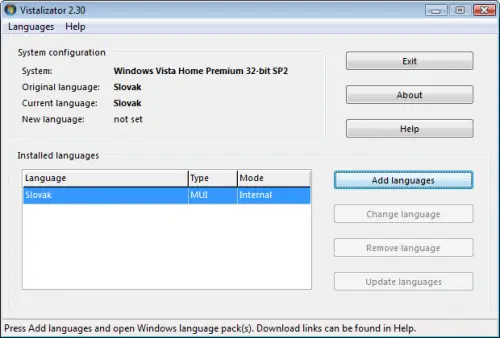
Vistalizator for Windows 7 SP1

There is a third party software called Vistalizator. Vistalizator can install the MUI language packs even on the non-supported Windows operating systems like Windows 7 Starter and Windows 7 Home Basic. Vistalizator can also be used with Windows Vista. Vistalizator gets rid of the one language pack restriction of the non-supported Operating Systems. You can install your favorite language pack with Vistalizator. Some features are listed here:

  • Works in 32-bit and 64-bit Windows Vista/Windows 7
  • Change Windows display language in less than 5 minutes! (Express installation mode)
  • Uses official Microsoft Windows language packs
  • You can install all 36 MUI languages and switch between them easily
  • You can install 55 Vista LIP languages on top of specific MUI languages
  • Compatible with Vista Service Pack 1 and Vista Service Pack 2
  • User Account Control (UAC) compliant – prompts for administrative privileges
  • Windows Speech Recognition works with all supported languages:
    Chinese, English, French, German, Japanese and Spanish
  • Languages can be installed either in Internal or in Express mode

How to use Vistalizator for Windows 7 SP1

  • Download Vistalizator from here
  • Download MUI language pack of your choice here.
  • Run Vistalizator and load the language packs that you have downloaded in the previous step
  • Press Add languages button
  • Wait for the installation process to complete and accept to change the display language
  • Restart the computer after changing the MUI language
  • Now Windows will start in the language that you have installed.

I think Vistalizator tool is very helpful for those who want to work in languages other than English which is the default language of Windows 7. What are your experiences about this Vistalizator tool? Use it and let me know through comments.

{ 53 comments… read them below or add one }

1 kangaro April 30, 2011 at 2:33 PM

hahaha slovensky jazyk :-D vo vistalizatore !

Reply

2 yuri June 7, 2011 at 7:38 PM

does not work under windows 7 sp1

Reply

3 Icke July 29, 2011 at 8:13 PM

1 does not work with win7 starter
2 does not longer work, vistalizer only works with RTM

Reply

4 Rosalie Blythe February 17, 2013 at 7:39 PM

How?? My netbook is running window 7 starter and the dafault language is French, i install both the French and Chinese language and it works just fine…(however, only one language can be installed in internal mode, other languages have to be installed in expressed modes)

Reply

5 Usman Khurshid February 18, 2013 at 11:11 AM

Windows 7 Starter does not support multiple language packs by design. You must have installed Language Interface Packs which are a subset of full language packs.

Reply

6 Abdullah September 3, 2011 at 8:22 AM

Hi guys .  if you   can not  run under Windows 7 SP1   try to Run programm win Compatible mode with windows 7. it will work !

Reply

7 Usman September 4, 2011 at 4:52 PM

WOW Abdullah wonderful tip. Thanks a lot for the fix :-)

Reply

8 Dennis November 4, 2011 at 1:45 AM

@Usman:

LOL, thanks very much for the tip. It works.

Reply

9 Anonymous December 15, 2011 at 4:08 PM

@Abdullah:

Right on, thanks!

Reply

10 YA Buddy! December 15, 2011 at 4:17 PM

@Abdullah: Right On!, Thanks Abdullah.

Reply

11 Anonymous December 12, 2011 at 11:03 AM

thank you Abdullah, it helps so much…

Reply

12 Steve December 19, 2011 at 8:17 AM

Hi there, I keep getting the “Sorry, the internal installation failed! As this an experimetal feature, success is not garanteed. You can always use express installation mode instead.”-errormessage. Can anyone help me?

I’ve tried rebooting my computer.

Regards,
Steve

Reply

13 Usman December 19, 2011 at 10:43 AM

@Steve: Can you tell me the specs of your computer and OS details? Which language pack are you trying to install? And at what point this error comes?

Reply

14 Nayeem December 20, 2011 at 7:30 AM

@Steve: try silent mode

Reply

15 Anonymous December 26, 2011 at 2:06 AM

@Nayeem and @Usman:

Problem has been solved. A Merry Christmas to you all too ;)

Regards,

Steve

Reply

16 Nayeem December 20, 2011 at 6:12 AM

thankx abdullah for tips

Reply

17 Anonymous December 21, 2011 at 2:22 AM

hello. I have a WIndows 7 Home Premum Service Pack 1, can I use Vistalizator?

Reply

18 Naine December 21, 2011 at 2:24 AM

Hi, I have a Windows 7 Home Premium Service Pack 1, 64 bits. Can I used Vistalizator to change the language?

Reply

19 Usman December 21, 2011 at 9:13 AM

@Naine: Yes you can use Vistalizator on your Windows 7 Home Premium because it overrides the limit of one MUI in non-ultimate editions of Windows 7.

Reply

20 Steve December 26, 2011 at 2:06 AM

Problem has been solved. Thank you all.

Regards,
Steve

Reply

21 Usman Khurshid December 26, 2011 at 2:22 AM

@Steve: Great work done Steve. Would you like to tell us how you solved your problem?

Reply

22 mail January 5, 2012 at 5:34 AM

64bit Win7 SP1 does not work with Vistalizator 2.40. It won’t install. How is the problem solved. can somebody please explain what steve means when he says problem solved?

Reply

23 Usman Khurshid January 5, 2012 at 6:12 AM

@mail: We’re still waiting for Steve’s answer.

Reply

24 konhEm January 13, 2012 at 10:21 AM

If you have SP1 installed, you can find a solution (for both 32/64 bit versions of Windows 7) here: [link without useful comment not allowed]

Reply

25 ashker January 23, 2012 at 11:56 AM

i tried it during installation i get this error message“Sorry, the internal installation failed! As this an experimetal feature, success is not garanteed. You can always use express installation mode instead.”

plz help

Reply

26 Usman Khurshid January 24, 2012 at 12:10 AM

We have already discussed this error here. You can use the express installation mode as the error suggests. This will make sure the installation is successful.

Reply

27 Ashker January 24, 2012 at 3:47 AM

My os is Windows7 starter. I tried mui english but i get the abov error durin instln. To try expres mode i cdnt find instl file. Plz help me bro

Reply

28 edu February 16, 2012 at 2:37 PM

Dont work on Seven Ultimate x64 Build 7601…:(

Reply

29 Usman Khurshid February 17, 2012 at 12:10 AM

@edu: I have the same edition of Windows 7 Ultimate x64 and Vistalizator is working for me. You only need to select the correct 64-bit language pack for your computer.

Reply

30 edu February 17, 2012 at 8:57 AM

@Usman Khurshid: tks for your reply but when i download the vistalizator and run show me a message box that the vistalizator dont work in this Windows version.

Reply

31 Usman Khurshid February 18, 2012 at 9:46 AM

@edu: You may try to run the downloaded language pack directly without using Vistalizator. Hopefully it will install as the Ultimate edition does not have any restriction over installation of additional language packs.

Reply

32 baba February 27, 2012 at 2:36 AM

I can not install the vistalizator 2.4 on win 7 starter edition.. any ideea?

“unable to use this version of Windows 7. this build (7601) is not suported.”
thx

Reply

33 Han March 9, 2012 at 9:19 AM

baba, I resolved this problem: right click on Vistalizator -Properties-Compatibility-Run this program in compatibility mode for Windows 7,i suppose you’re running Windows 7 Service pack1-this creates problems.

Reply

34 Fab March 18, 2012 at 2:08 AM

@Han: Thank you so much! This works perfectly.

Reply

35 jatiwulung April 11, 2012 at 6:23 PM

I choose internal mode, and it failed to install any MUI lang-pack.
So, I installed MUI lang-pack using express mode for arabic and french instead.

My question is, which is better for long-term use, express or internal mode in Vistalizator?

Reply

36 game avatar May 6, 2012 at 8:45 PM

i can confirm that the Vistalizator,product version 2.40 works on W7 Vistalizator Sp1 along with “windows6.1-kb972813-x64-en-us_483a3e51038f1a369bc5b5cdf5fc32df3ea4ad27″ version of language pack.
I just changed the OS language from French to English. One thing thoughm the Vistalizator has to be set in “Properties” to W7 compatibility mode and when adding language should be done in Express mode (you’ll see when it happens)

Reply

37 abu odwan May 21, 2012 at 1:34 AM

Hi every one
I need to tell you that the new version of vistalizator has been relesed ver2.50
and its work on windows 7 sp1 in 22 april 2012

i hope i become useful to all of you in this

Reply

38 Usman Khurshid May 21, 2012 at 1:42 AM

Thanks a lot for the update. Actually I had written about it when it was released here:
http://www.technize.net/vistalizator-download/

All our articles have been updated and download link to the latest version of Vistalizator for Windows 7 SP1.

Reply

39 netodude June 18, 2012 at 2:41 PM

I tried setting it to compatability with windows 7 (I’m on 7 home prem) and I’m still getting the failed message. Why.? D:

Reply

40 Donald October 31, 2012 at 5:41 PM

Hi. I recently bought a Lenovo 15.6inchLaptop/ CPU:Celeron Dual-Core B820/1.7GHz/ 2 Core Memory:4GB/ HDD:320GB/ OS:Windows 7 Home Premium 64bit SP1, and the OS was in Japanese. I downloaded Vistalizator and the MUI English Language Pack – but instead of clicking on the MUI for Windows 7 64 SP1, I clicked and downloaded the MUI for Windows 7 64 RTM. The English language pack was installed but when I clicked on “Change Language” in Vistalizator, I got an error message saying something like “this language pack in incompatible with your computer specs”, or something to that effect. Then I realized that I had not downloaded the SP1 pack. So I tried to first un-install the English pack that was already installed but I keep getting “uninstallation failed”, even after several attempts of restarting the laptop. And the OS remains in Japanese. So I installed the SP1 English pack anyway. I then click on “Change Language” and I get the instruction to “Exit program to restart the system and the changes will take place”. Even after the computer exits and restarts on its own, the language hasnt changed. But the Vistalizator window shows that both English and Japanese language packs are installed. I am worried about uninstalling the Japanese language pack.
What should I do??

Reply

41 Usman Khurshid November 2, 2012 at 12:48 AM

How you are uninstalling the additional language pack? Here’s the complete step by step guide on how to uninstall language packs from Windows 7. Just make sure you are uninstalling the additional language pack first and then reinstall it to change languages:
http://support.microsoft.com/kb/972813

The additional language pack in your case will be English!

Reply

42 Usman Khurshid November 2, 2012 at 12:50 AM

Another thing that should be considered is that you can not remove the default system language. So you will not be able to uninstall the Japanese language pack even if you have installed the English one. The best thing to do here is just install the English language pack and change the language to English. Leave the Japanese language pack as it is.

Reply

43 Usman Khurshid November 2, 2012 at 12:51 AM

Sorry for so many broken replies. You can also uninstall the language pack in Windows 7 by using LPKSETUP command. Here’s the complete step by step instructions:
http://maximumpcguides.com/windows-7/uninstall-language-packs-in-windows-7/

Reply

44 Amit November 17, 2012 at 3:58 AM

I am get this error msg:
“Sorry, the internal installation failed! As this is an experimental feature, success is not garanteed. You can always use Express installation mode instead.”
I want the solution and fix this problem. Guide me please?

Reply

45 Payan November 20, 2012 at 8:26 AM

Amit

i fixed that error chanching install mode, just double click on the mode column and it will change from internal to express.

Reply

46 Usman Khurshid November 20, 2012 at 8:59 AM

Thumbs up for the timely solution Payan :-D

Reply

47 Anonyme January 11, 2013 at 6:56 AM

I have windows 7 home premium sp3 can i change language ?

Reply

48 Mick January 18, 2013 at 11:55 AM

Do NOT use this method if you don’t want to corrupt your genuine copy of windows. This program overwrites certain windows core files which then make Windows non-genuine and prevent you from updating amongst other things!

Reply

49 Usman Khurshid January 18, 2013 at 12:56 PM

Can you specify which core files are being overwritten by this software? Did you get your Windows non-genuine using this method?

Reply

50 game mobile January 28, 2013 at 7:24 PM

Another thing that should be considered is that you can not remove the default system language. So you will not be able to uninstall the Japanese language pack even if you have installed the English one. The best thing to do here is just install the English language pack and change the language to English. Leave the Japanese language pack as it is

Reply

51 game mobile February 21, 2013 at 8:02 PM

I am get this error msg:
“Sorry, the internal installation failed! As this is an experimental feature, success is not garanteed. You can always use Express installation mode instead.”
I want the solution and fix this problem. Guide me please?

Reply

52 Usman Khurshid February 22, 2013 at 3:28 AM

You can run the tool in express installation mode. It will work fine.

Reply

53 Guest March 26, 2013 at 5:12 AM

Thank you very much. Saved lot of time.

Reply

Leave a Comment

Previous post:

Next post: